BEMRIX / Automotive website
ShineLane
Auto CareConsidered design.
A complete booking experience.
A premium detailing website that connects service discovery, appointment booking and the day-to-day work of managing a schedule.
Self-initiated concept · Designed & developed by BEMRIX- Industry
- Automotive detailing
- Our role
- Brand direction, UI/UX & development
- Scope
- Website, booking system & admin
- Context
- Fictional Lahore-based business
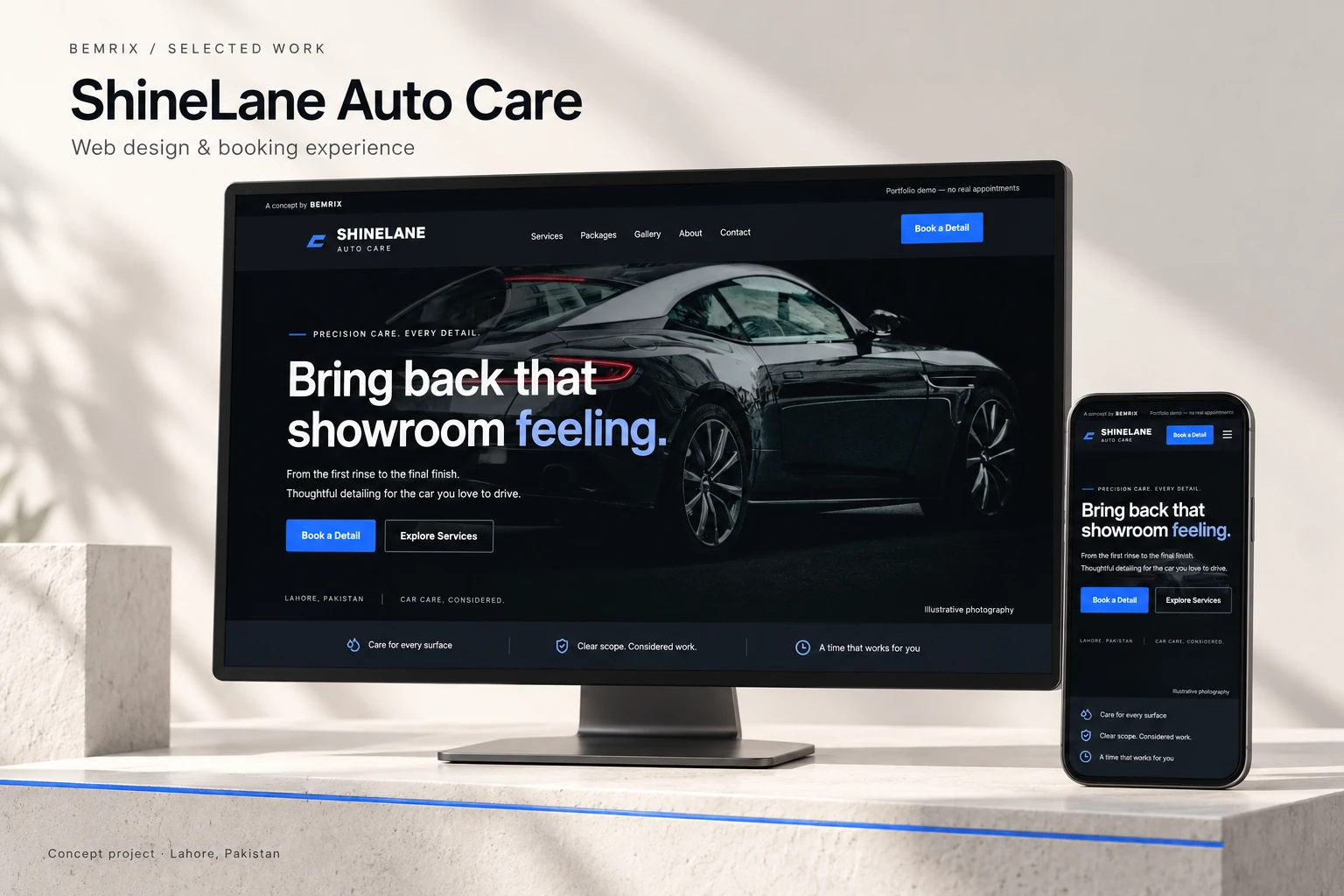
The brief
Turn interest into a clear next step.
For a detailing business, a strong first impression is only the beginning. Visitors also need to understand the service, compare the cost, and find a time that works. The operator needs a schedule that reflects the time and space each job actually requires.
BEMRIX designed and built both sides of that journey. ShineLane combines a distinctive public website with a working, database-backed booking system and a protected management area. It demonstrates how a business website can support the service itself.
01 / The website
Make the quality visible.
Make the offer clear.
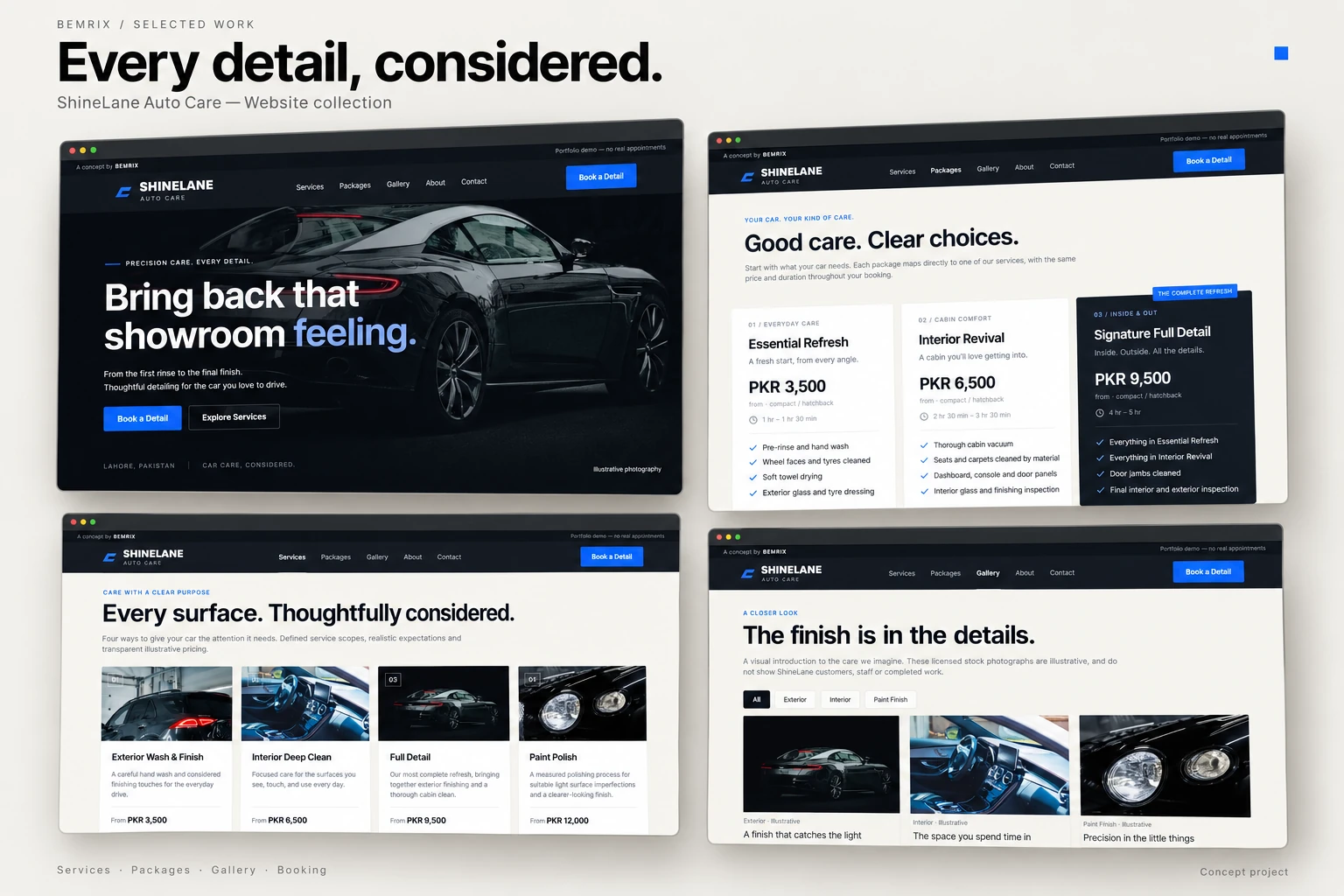
Graphite backgrounds, warm white sections and restrained electric blue give ShineLane a precise automotive identity. Large vehicle photography sets the mood; readable layouts and clear booking buttons keep the next action easy to find.
Four service pages explain inclusions, exclusions, preparation and estimated duration. Three comparable packages use the same prices and service data as the booking form. Vehicle categories and compatible extras help visitors understand what they are choosing before they reserve a time.
Clear service scope
Visitors can compare an exterior refresh, interior clean, full detail and paint polish without guessing what is included.
Responsive by design
The navigation, service cards and forms adapt to smaller screens, with visible focus states and keyboard-friendly controls.
Honest presentation
Illustrative images are labelled, and FAQs explain the fictional demo without fake reviews or unsupported service promises.
02 / The booking journey
From “which service?”
to “that time works.”
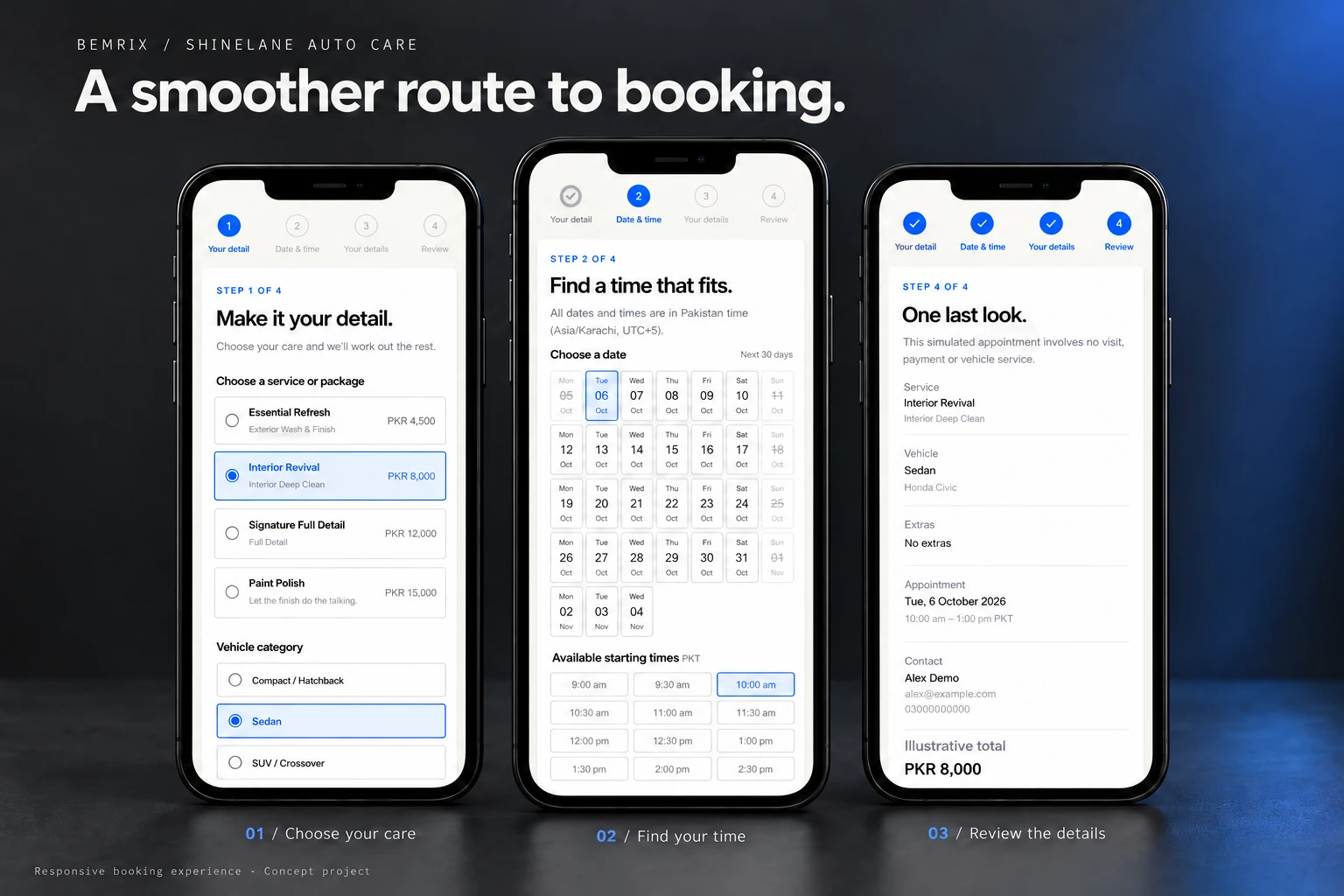
The guided form breaks the decision into four manageable stages. Service and package links preselect the right option, while the price and duration respond to the vehicle category and compatible extras.
Entries remain in place when visitors go back or a request fails. Availability is checked again at confirmation, and a taken slot leads to a clear message and another choice. A successful demo booking returns a reference, private management link and calendar download.
- 01
Choose your care
Service, vehicle category, optional make and model, and compatible extras.
- 02
Find your time
Available dates and start times, displayed explicitly in Pakistan time.
- 03
Add your details
Sample contact information, optional notes and clear consent.
- 04
Review & confirm
Appointment, estimated finish and total together before the final action.
Availability that reflects the work
A long detail needs more than an empty start time.
The demo accounts for two bays, service and extra duration, a cleanup buffer, opening hours, blocked periods and existing appointments. These rules are configurable for the operator.
- A bay is assigned only when the complete reserved interval fits.
- The final availability check and reservation are saved together to prevent competing requests from taking the same bay.
- Repeat submissions return the same reservation, rather than creating duplicates.
- Confirmed cancellation releases capacity; private booking access requires an unguessable link.
03 / Behind the scenes
A useful workspace
after the booking arrives.
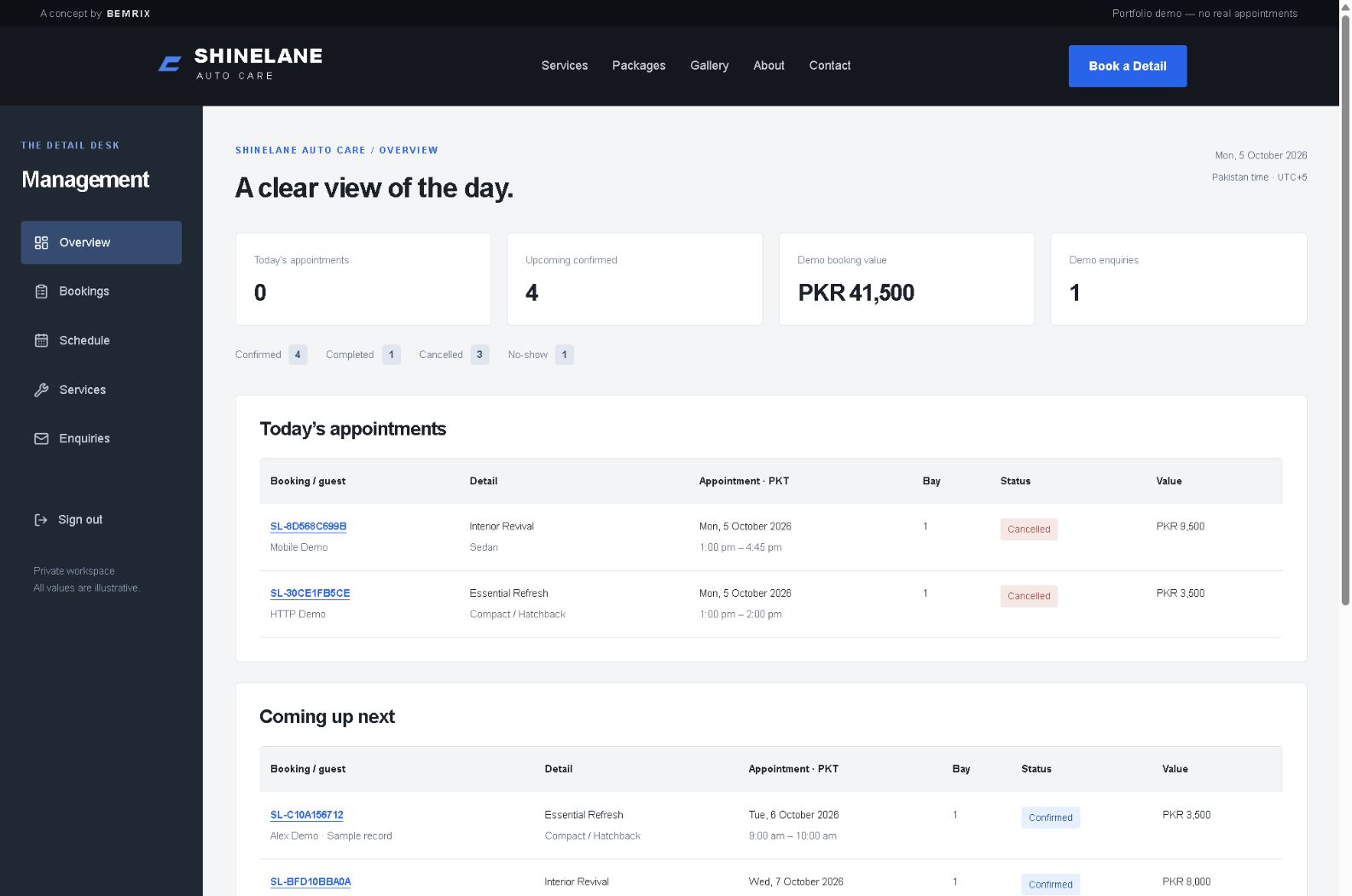
A protected dashboard brings today’s appointments, upcoming bookings, status counts and illustrative booking value into one place. List and calendar views, search and filters help an operator locate the right reservation.
Rescheduling checks capacity again. Changes to opening hours or blocked time flag conflicting bookings before they can disrupt the schedule. Service prices, descriptions, durations and extras can be edited, while existing bookings retain their original details.
Appointments
View assigned bays, inspect details, reschedule, cancel and apply validated completed or no-show statuses.
Schedule & services
Manage opening hours, bay capacity, cleanup time, blocked periods and the service catalogue.
Enquiries
The public contact form validates and stores demo enquiries for private review and deletion.
04 / The build
The interface and the logic,
built together.
Next.js, React and TypeScript power the experience, with Tailwind CSS for styling and SQLite for persistent appointments. The source includes setup instructions, sample data, image attribution and documented operating limits.
Checked beyond the happy path.
Verification covered prices, compatible extras, closing times, cleanup buffers, cancellation, protected access and rescheduling conflicts.
- 15 automated booking tests passed.
- Six simultaneous processes competing for two bays resulted in exactly two successful bookings.
- Build, type checks and lint passed for the demo application.
- HTTP checks and mobile booking, cancellation and keyboard interactions were exercised.
These are implementation checks, not a claim of formal accessibility certification, exhaustive security testing or measured client results.
What a live launch would involve
A working concept, with a clear path to production.
The demo provides on-screen confirmation; email, SMS, payments and real business contact channels are not connected. A live launch would need agreed provider integrations, secure hosting, backups, retention processes and testing against the business’s operating requirements. The current database design is intended for one persistent server.
ShineLane is a fictional, self-initiated BEMRIX portfolio project. No real appointments or payments occur. Mockups place the working interface in AI-generated presentation settings; the management image is an original screenshot. Small mockup details may differ from the application.
For your business
Start with the way
you work.
01Could this approach work for my service business?
The same approach can be adapted around your services, staff or resource capacity, opening hours and customer journey. We would agree the workflow and requirements for your business before choosing the implementation.
02Can you connect reminders, payments or our existing tools?
Integrations can be scoped after reviewing your providers, accounts and available APIs. ShineLane does not currently send reminders or take payments; those connections would be planned, implemented and tested as part of a live project.
03What would we plan first?
We would map your services, how customers choose and book them, what your team needs to manage, and the content and integrations required for launch. That gives the project a useful first release and a clear scope.
Your next project
Give your service business
a website that works with it.
Let’s plan the experience your customers need—and the tools your team will use.